
Supported Bit Versions
  1. 64-bit
Source Code URL
https://github.com/dev47apps/droidcam-obs-plugin
Minimum OBS Studio Version
25.0.0
Supported Platforms
  1. Windows
  2. Mac OS X
  3. Linux
The DroidCam OBS plugin let's you connect your phone and get high quality audio & video directly into OBS, just like a regular camera source.
  • Requires the DroidCam app, available for Android and iOS.
  • Direct OBS integration, no need for separate client software.
  • You can connect multiple devices at the same time, using WiFi or USB*.
  • Free unlimited usage at standard definition (640x480), including sound and picture.
  • Up to 1080p60 or 4k30* video, and 48kHz stereo audio (on supported devices).
  • DSLR -like features including exposure, white balance, and focus controls.
  • Use Ultrawide and Telephoto lenses on supported devices.
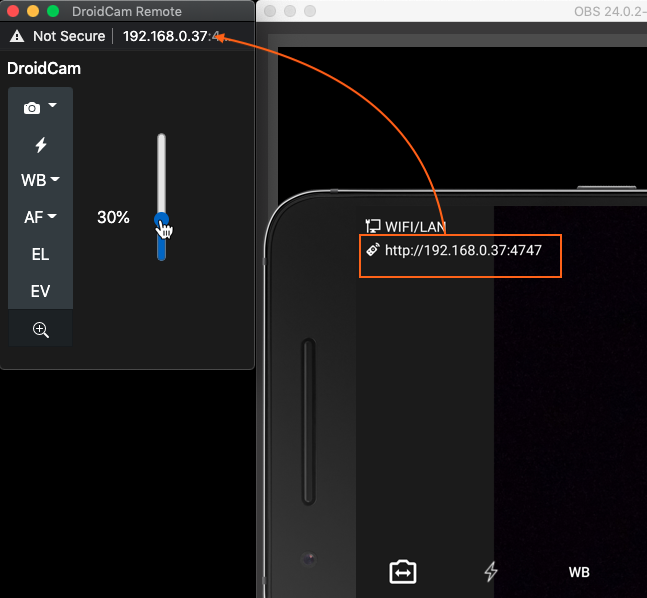
  • Remote camera controls via custom browser dock in OBS Studio.
  • In-app Pro upgrade unlocks all features and helps support the app.
  • Minimalistic, simple, and efficient.

Go to droidcam.app/obs for more details and up-to-date downloads.
*Extra setup required, consult the website for details.
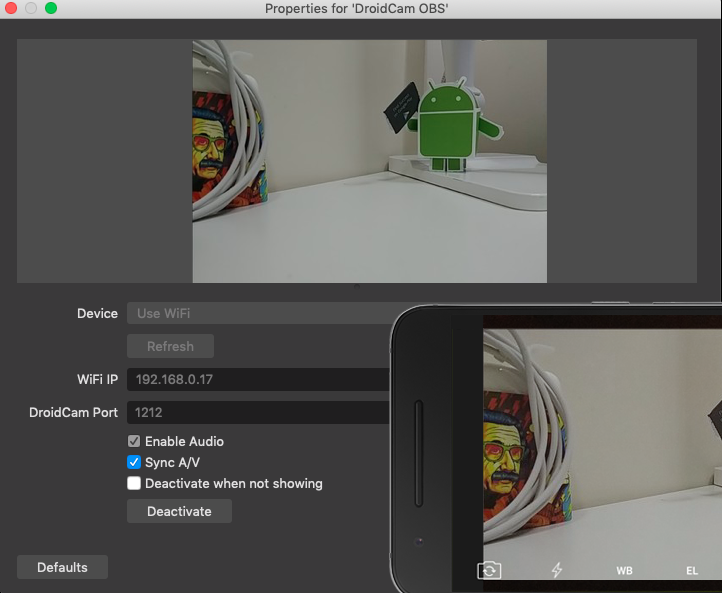
droidcam_obs_props.png


droidcam_obs_remote.png


Reviews and Videos


Español

Deutsche

Français

Português


And many more...
Author
dev47
Downloads
470,927
Views
1,311,849
First release
Last update
Rating
4.56 star(s) 16 ratings

More resources from dev47

Latest updates

  1. 2.4.2

    [Windows only] Workaround for iOS USB issues some users have been encountering since v2.4.0.
  2. 2.4.1

    Support for OBS Studio version 32.
  3. 2.4.0

    Added arm64 builds for Windows, to go along with OBS 31.1. Note: USB support is limited due to...

Latest reviews

I tried to tell you on 27th sept via playstore review that the latest update of OBS studio i.e. OBS 32.0.1 and the one before it, lost the option to add droidcam as a source. Please check the images shared.
It also asks me to remove the droidcam obs plugin. Now tell us how to use this pro version with OBS. You got to do something cause this is impacting hundreds of thousands people, I am sure.

https://ibb.co/album/FgPfHD
Saya sudah pakai pada HP saya dan berjalan dengan baik.
We're using DroidCam (pro) for ~3 years to live-stream our Badminton matchesi in Full-HD.
Droidcam is reliable, has a low latency und is updated regularly.

Only the latest release, after the long summer break, needed a restart of our Android cameras.
We trust DroidCam and rely on this solution.
Makes you watch ads then doesn't unlock pro... can't rotate to portrait mode to work for where i'm streaming not seen by other apps so cant use background removal that i pay for also does not let you choose resolution or any camera settings making my Pixel 8 Pro camera look like a cheap webcam
dev47
dev47
Hi there. The app supports up to 4K resolution and most camera settings; You can rotate the source in OBS Studio as usual; the Ad-Tier option is for removing the watermarks and not unlocking all Pro options. The app website has detailed documentation on most of this, and you can email/post here for extra support.
I use the Droidcam virtual camera instead of the OBS Virtual cam - because downstream keyer content will be shown with it. Great work - thanks a lot!
Hello, I am very enthusiastic about the app.
Would it not also be possible to use the app via mobile data? So that you can leave your PC running and then use the app to stream to the OBS on your PC at home while on the move? That would be very cool, because you could keep your overlay as it is. A twitch chat function would still be helpful, but if you could stream to your OBS at home, that would be wonderful.
dev47
dev47
Hi, Thanks for your review. Streaming via mobile data requires extra guards against the less reliable network, and there would also be a need for cloud servers to mediate the connection. This is currently outside the core purpose of this plugin/app -- which is to act as a webcam replacement / simple DSLR. You could try vdo.ninja as an alternative, which I believe works both via Wifi and mobile data.
after last update the lag on usb connection became horrible - it's at least 500ms ;/
dev47
dev47
Sorry, cant help thru the reviews here. Would you mind instead posting in the discussions or emailing directly, support@dev47apps.com.
Works great with my Pixel 4a
very nice plugin
excelente funciona de 10, en mi Moto G30, lo que aun no puedo hacer es utilizar el lente gran angular, por lo demás vale la pena lo pagado
Top