
PTZ Controls

PTZ Controls 0.18.2

Supported Bit Versions
  1. 64-bit
Source Code URL
https://github.com/glikely/obs-ptz
Minimum OBS Studio Version
31.1.0
Supported Platforms
  1. Windows
  2. Mac OS X
  3. Linux
The plugin adds PTZ camera control to OBS Studio that can control multiple cameras, and can automatically change selected camera based on the currently active preview or program scene.

The plugin supports the VISCA serial, VISCA-over-IP, Pelco, ONVIF and USB UVC protocols, with plans to add support for other camera control protocols in the future.
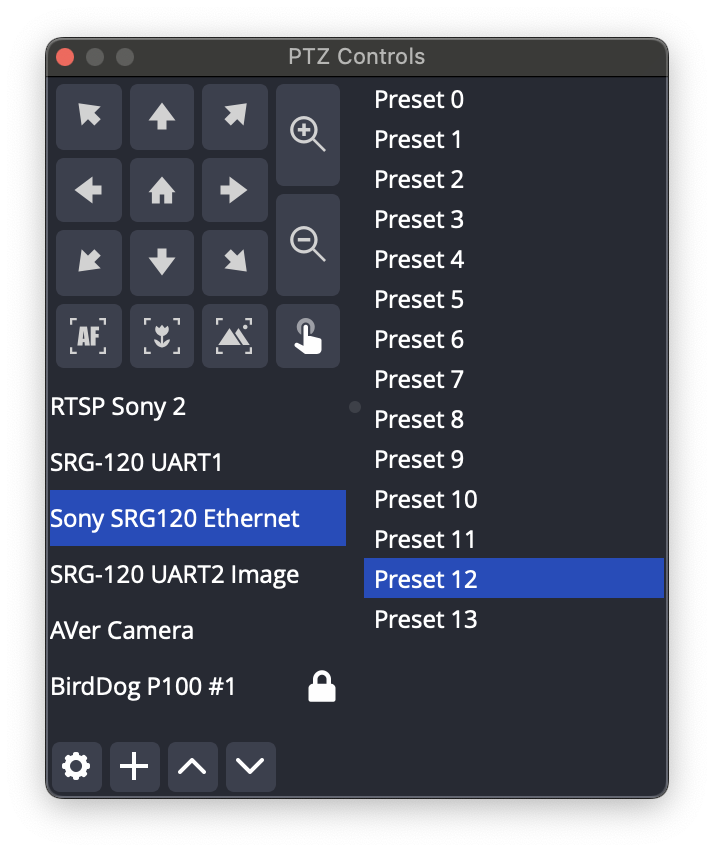
ptz-controls-screenshot.png

ptz-settings-screenshot.png


Jimcom USA was nice enough to post a video review:
Author
glikely
Downloads
142,340
Views
431,527
First release
Last update
Rating
4.29 star(s) 31 ratings

More resources from glikely

Latest updates

  1. PTZ Controls 0.18.2 released

    This is a maintenance release to support OBS Studio 32.0.1. There are no functional changes...
  2. PTZ Controls 0.18.0

    em que aprendo a falar português I'm quite happy with this release. Not only does the plugin...
  3. First 0.18.0 prerelease

    I'm getting ready to create a new release of PTZ controls. There are lots of reliability and...

Latest reviews

I just started using this plugin and haven't kicked the tires too hard (yet). I was able to get things running fairly quickly and am happy to avoid integrating a hardware controller. I'm using this in a small church livestream application. Thanks to Grant Likely and all the developers providing support.
Just purchased an OBSBot Tiny 2 Lite and this plugin works well with it.
I've instaled the plugin on OBS in my Mac Mini M4 to control my camera via USB, i appears in OBS but it doesn't show the camera when i'm going to add a new source, can anyone help?
glikely
glikely
Unfortunately USB cameras are not supported on MacOS yet. Sorry
I am using OBS 28.0 and the obs-ptz-v0.15.4 plugin. The camera used is the PTZ-Mini, with a VISCA (Serial) connection, currently on USB COM3.
When starting OBS, the PTZ-Control does not work; the camera does not move. So, I need to close OBS, disable COM3 in the device manager, enable COM3 again, and then open OBS again. The camera control then works normally.
The problem is that I always have to do this every time I start OBS.
I had to create a script to do this automatically.
I upgraded to OBS 30.2.0 and PTZ Controls 0.18.0, but in this version, the control simply does not work, even after disabling and enabling COM3. In this version, the control stopped working, so I had to revert to OBS 28.0 and PTZ-Control 15.4.
glikely
glikely
I'm sorry to hear that you're having problems with the plugin. Please file an issue on https://github.com/glikely/obs-ptz/issues with a description of the problem and log files from using both the old version and the new one.
Really a great program! Thanks for taking time to keep updating and improving this plugin.
glikely
glikely
Thank you for the review and kind words. I’m glad it is useful for you
Great, your version 17 is not crashing updated OBS like version 15 did!
Perfeita a nova atualização com cameras usb uvc. 100%
glikely
glikely
Thanks for the feedback, and I’m glad it is working well for you
I seem to be having an issue with either my system or the hardware. I try to add a VISCA camera and it crashes the OBS System. I installed the latest version and it still crashes. Any suggestions would be helpful. I have tried using another PTZ controller app and and my CISCO Tandberg TTC8-02 does not respond. I order a remote to see if it will control the PTZ. Any help would be appreciated.
glikely
glikely
The current release doesn't work on OBS Studio 30.0.x or later due to the Qt library version changing. I'm working on a new stable release. In the mean time you can go to the download page and give one of the unstable prereleases a try
Infelizmente o plug-in se limita ao OBS 28 e se atualizo perde a funcionalidade. Alguém conhece outro? Caso eu consiga contgrolar a câmera fora do OBS eu faço a transmissão direto do Youtube mesmo.
glikely
glikely
I'm working on a new release. Could you help with testing? There are prerelease builds available on the Github releases page. Give it a try and let me know how it is working.
was working excellently then i decided to update obs like an idiot from 20s to 32
glikely
glikely
Sorry for the trouble! A new stable release will be out soon.
Top