

Nope. Breaking changes should not be rolled out in self updating software. Never.Simple reinstall the previous OBS version you all where using and all works again.
Then wait until a new version of OBS with the fix is released and you can first test it and then deploy it to the production environment. Never update or change anything without testing it first.
You are using an out of date browser. It may not display this or other websites correctly.
You should upgrade or use an alternative browser.
You should upgrade or use an alternative browser.
OBS Version 32.0.0 removed --disable-shutdown-check
- Thread starter ClosedTicket69
- Start date

PaiSand
Active Member
The change isn't breaking anything.Nope. Breaking changes should not be rolled out in self updating software. Never.
You shouldn't ever update, change or add anything on a production environment until tested on a test environment. Good practices.
It is breaking numerous installations where disable-startup-check is requiredThe change isn't breaking anything.
You shouldn't ever update, change or add anything on a production environment until tested on a test environment. Good practices.
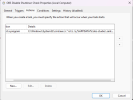
I get this error.Interesting. Did it not work for you? It works fine for me without this change. There are no spaces in the path, so I don't see why quotes are required there. Its more impoortant that the entire command is wrapped in quotes so it appears as one to the /c argument.
I fixed this in my guide on Github, but editing posts is not allowed here. I've reported the post with my edit request. I believe 15 seconds should be fine for SSDs and HDDs as its an empty folder. Others may also not want to wait 2-3 minutes.

Auto-start OBS with Windows and disable shutdown check.md
GitHub Gist: instantly share code, notes, and snippets.gist.github.com
Attachments


KittieCatKay
New Member
I would second reinstating this flag. I have automated my obs using the task scheduler. These intentionally kill obs. I do not want to get an error message every time they do this, as that also breaks a few automated scripts I have made.


Akelaphobia
New Member
Really annoyed they removed this..

Robert-S
New Member
Please please please reinstate the disable-shutdown-check argument!!
I regularly use Windows Task Scheduler to start OBS for streaming a church service. It's vital that I also set up a scheduled task to STOP OBS, but there doesn't seem to be any 'clean' way of exiting the program by command line. The only way (that I have been using for years) seems to be to kill the obs.exe process. This works fine - but it is clearly seen by OBS as a bit dirty. So be it! It's vital that the next scheduled start of OBS is not disabled - so it's vital that I disable the shutdown check.
I feel very disappointed that this feature has been removed without apparent consideration for those who use this kind of automation.
I regularly use Windows Task Scheduler to start OBS for streaming a church service. It's vital that I also set up a scheduled task to STOP OBS, but there doesn't seem to be any 'clean' way of exiting the program by command line. The only way (that I have been using for years) seems to be to kill the obs.exe process. This works fine - but it is clearly seen by OBS as a bit dirty. So be it! It's vital that the next scheduled start of OBS is not disabled - so it's vital that I disable the shutdown check.
I feel very disappointed that this feature has been removed without apparent consideration for those who use this kind of automation.
GameBizzTV
New Member
set dir="C:\Users\Codename-GrayWolf\AppData\Roaming\obs-studio\.sentinel"
rmdir /s /q %dir%
mkdir %dir%
This is a fix I came up with and for me it's simple yet effective to stop the Shutdown Error Check.
1. Open Notepad and copy and paste the batch code above.
2. Save the file name as, OBS Empty .sentinel Folder.bat
3. Place the .bat file and OBS shortcut here: C:\ProgramData\Microsoft\Windows\Start Menu\Programs\Startup
Now when the .bat file starts up at logon, it will empty the .sentinel folder before OBS auto starts and there will be no more shutdown error check message. I have attached a .7z archive file with the .bat file inside.
rmdir /s /q %dir%
mkdir %dir%
This is a fix I came up with and for me it's simple yet effective to stop the Shutdown Error Check.
1. Open Notepad and copy and paste the batch code above.
2. Save the file name as, OBS Empty .sentinel Folder.bat
3. Place the .bat file and OBS shortcut here: C:\ProgramData\Microsoft\Windows\Start Menu\Programs\Startup
Now when the .bat file starts up at logon, it will empty the .sentinel folder before OBS auto starts and there will be no more shutdown error check message. I have attached a .7z archive file with the .bat file inside.
Attachments

eoburtjo
New Member
I FOUND A FIX FOR LINUX, FLATPAK SPECIALLY, THIS COULD BE ADAPTED FOR OTHER PACKAGES FORMATS
i just changed my exec line at my desktop file:
Exec=/bin/bash -c 'dir="/home/$USER/.var/app/com.obsproject.Studio/config/obs-studio/.sentinel"; rm -rf "$dir"; mkdir -p "$dir"; exec /usr/bin/flatpak run --branch=stable --arch=x86_64 --command=obs com.obsproject.Studio'
for --startreplaybuffer --minimize-to-tray
i used:
Exec=/bin/bash -c 'dir="/home/$USER/.var/app/com.obsproject.Studio/config/obs-studio/.sentinel"; rm -rf "$dir"; mkdir -p "$dir"; exec /usr/bin/flatpak run --branch=stable --arch=x86_64 --command=obs com.obsproject.Studio --startreplaybuffer --minimize-to-tray
you just need to find out where is your obs user data folder and adjust, for flatpaks /home/$USER/.var/app/ its supposed to be universal
i just changed my exec line at my desktop file:
Exec=/bin/bash -c 'dir="/home/$USER/.var/app/com.obsproject.Studio/config/obs-studio/.sentinel"; rm -rf "$dir"; mkdir -p "$dir"; exec /usr/bin/flatpak run --branch=stable --arch=x86_64 --command=obs com.obsproject.Studio'
for --startreplaybuffer --minimize-to-tray
i used:
Exec=/bin/bash -c 'dir="/home/$USER/.var/app/com.obsproject.Studio/config/obs-studio/.sentinel"; rm -rf "$dir"; mkdir -p "$dir"; exec /usr/bin/flatpak run --branch=stable --arch=x86_64 --command=obs com.obsproject.Studio --startreplaybuffer --minimize-to-tray
you just need to find out where is your obs user data folder and adjust, for flatpaks /home/$USER/.var/app/ its supposed to be universal
Ubuntu:
Bash:
$ cat > ~/.local/share/applications/com.obsproject.Studio.desktop << 'EOF'
[Desktop Entry]
Version=1.0
Name=OBS Studio
GenericName=Streaming/Recording Software
Comment=Free and Open Source Streaming/Recording Software
Exec=/bin/bash -c 'rm -rf /home/$USER/.config/obs-studio/.sentinel; obs --disable-shutdown-check'
Icon=com.obsproject.Studio
Terminal=false
Type=Application
Categories=AudioVideo;Recorder;
StartupNotify=true
StartupWMClass=obs
frederic1
Member
I would second reinstating this flag. I have automated my obs using the task scheduler. These intentionally kill obs. I do not want to get an error message every time they do this, as that also breaks a few automated scripts I have made.
Same here. I automated an OBS daily recording using the Task Scheduler which intentionally kills OBS after 3 hours of recording. The OBS devs should provide a command line switch to shut down OBS after a specified amount of time instead of removing "--disable-shutdown-check" !!!! I'm reverting to 31.1.2 (with regret).
Last edited:
bigjeffresh
New Member
So i wanted to share something that I noticed today with this issue. Everytime I press the X to close OBS its when I re-open it this error occurs. If I actually click File --> Close I do not get the error when re-open OBS
valeriya-cyka-bylat-valis
New Member
i think it came back in 32.0.3 but i am not sure. can somebody confirm?
valeriya-cyka-bylat-valis
New Member
32.0.2 my dad's office PC - the command --disable-shutdown-check is sill being ignored

installing the update to 32.0.3 (somehow winget alarms me through unigetUI that 32.0.3 is available in winget-pkgs repositories but since there is this nasty bug https://github.com/microsoft/winget-pkgs/issues/105965 because edge and other programs won't let obs close itself or get closed because maybe they use obs as a webcam, i had to kill so many other programs to update obs through winget until i was sick of it and just used winget/unigetUI for alarming me that there is a new Update for OBS so i opened obs if it wasn't and updated obs through obs itself. it was always installing updates this way as if obs developers knew how to update obs without being interrupted by other programs using obs and preventing the update, preventing the killing of obs).
this time the update went on most computers straight through, no other process was interrupting (yes sometimes this happaned, too)...

putting a shortcut to obs (mostly "C:\Program Files\obs-studio\bin\64bit\obs64.exe" and adding --disable-shutdown-check) into win-key + r and shell:startup, restarting...

No errors! obs 32.0.3 finally allows it <<< --disable-shutdown-check is back baby!
installing the update to 32.0.3 (somehow winget alarms me through unigetUI that 32.0.3 is available in winget-pkgs repositories but since there is this nasty bug https://github.com/microsoft/winget-pkgs/issues/105965 because edge and other programs won't let obs close itself or get closed because maybe they use obs as a webcam, i had to kill so many other programs to update obs through winget until i was sick of it and just used winget/unigetUI for alarming me that there is a new Update for OBS so i opened obs if it wasn't and updated obs through obs itself. it was always installing updates this way as if obs developers knew how to update obs without being interrupted by other programs using obs and preventing the update, preventing the killing of obs).
this time the update went on most computers straight through, no other process was interrupting (yes sometimes this happaned, too)...
putting a shortcut to obs (mostly "C:\Program Files\obs-studio\bin\64bit\obs64.exe" and adding --disable-shutdown-check) into win-key + r and shell:startup, restarting...
No errors! obs 32.0.3 finally allows it <<< --disable-shutdown-check is back baby!
valeriya-cyka-bylat-valis
New Member
i wasn't able to update obs by itself because the version 32.0.3 wasn't on the official site, only in the winget-pkgs repositories. so i updated obs with winget/unigetUI.
frederic1
Member
No errors! obs 32.0.3 finally allows it <<< --disable-shutdown-check is back baby!
Not for me, alas !
> https://youtu.be/KPypD987OF4 (video is in french, sorry)
frederic1
Member
To close my daily recordings cleany after 3 hours, I have just decided to do this :
In "OBS > Output Timer", I have put : 3 hours
In "Task Scheduler", I have put :
Program : powershell.exe
Args : -Command "Start-Process 'C:\Program Files\obs-studio\bin\64bit\obs64.exe' --startrecording --minimize-to-tray; Start-Sleep -Minutes 185; (Get-Process obs64).CloseMainWindow()"
------------------------------
Here's what it will do :
1 - Launch a recording by running the command :
3 - Close the window cleanly 5 minutes later
4 (optional) - You can, if you want, add a task kill in the "Parameters" tab of Task Scheduler to kill the task if for some reason OBS is still running, but it shouldn't be necessary.
------------------------------
But it would be soooo much better if there were a command line switch to close OBS after a specified amount of time. It shouldn't be hard to do ?
In "OBS > Output Timer", I have put : 3 hours
In "Task Scheduler", I have put :
Program : powershell.exe
Args : -Command "Start-Process 'C:\Program Files\obs-studio\bin\64bit\obs64.exe' --startrecording --minimize-to-tray; Start-Sleep -Minutes 185; (Get-Process obs64).CloseMainWindow()"
------------------------------
Here's what it will do :
1 - Launch a recording by running the command :
2 - Stop recording after 3 hours (180 minutes)powershell -Command "Start-Process 'C:\Program Files\obs-studio\bin\64bit\obs64.exe' --startrecording --minimize-to-tray; Start-Sleep -Minutes 185; (Get-Process obs64).CloseMainWindow()"
3 - Close the window cleanly 5 minutes later
4 (optional) - You can, if you want, add a task kill in the "Parameters" tab of Task Scheduler to kill the task if for some reason OBS is still running, but it shouldn't be necessary.
------------------------------
But it would be soooo much better if there were a command line switch to close OBS after a specified amount of time. It shouldn't be hard to do ?
Last edited:
valeriya-cyka-bylat-valis
New Member
maybe killing obs through gestionnaire des taches (LOL) and reopening it with --disable-shutdown-check isn't the correct way.Not for me, alas !
> https://youtu.be/KPypD987OF4 (video is in french, sorry)
i need --disable-shutdown-check only for restart to get back to obs once the PC and windows have fully started and booted.
i would never kill it with task-manager (not yet but also never did). btw cool desktop and setup you have buddy.
greetings from north germany buddy. christmas 2025 will be the warmest ever!
it's a bit strange that you are recording WHILE killing obs. it's like you have 2 instances of obs. sometimes i have 2 instances of obs if i want to use virtual webcam too.
Last edited:
frederic1
Member
Valeriya, thanks for your kind words on my Desktop setup. I'm a bit old school ;-)
I was manually killing OBS just to see if "--disable-shutdown-check" was back. I think most people in this topic want this switch to come back because OBS offers no way to cleanly close itself after a specified amount of time (so some people just kill OBS using the Task Scheduler).
Hahaha, no I'm not running 2 instances of OBS :) I was recording my screen with Bandicam (you can see it during the last second of the video).
I was manually killing OBS just to see if "--disable-shutdown-check" was back. I think most people in this topic want this switch to come back because OBS offers no way to cleanly close itself after a specified amount of time (so some people just kill OBS using the Task Scheduler).
Hahaha, no I'm not running 2 instances of OBS :) I was recording my screen with Bandicam (you can see it during the last second of the video).